Where QR codes actually earn their keep
Short answer: QR codes pay off anywhere they replace typing, asking, or fumbling with a single camera scan — a restaurant table, a shop counter, a Wi-Fi sticker on the wall of a café. They fail anywhere the scan is slower or more awkward than the thing it replaces. Keep that one test in mind and every decision in this guide gets easy, because the code itself is never the point; the saved step is.
Most small businesses meet QR codes through menus. A table tent or a counter sticker with a code that opens your menu means no reprinting when prices change, no laminated sheets to wipe down, and a menu that lives in the customer's pocket where they can zoom the text. The win is not novelty. It is that the menu is always current, and updating it costs you thirty seconds instead of a print run.
Reviews are the second place QR codes genuinely earn their keep. A code at the till, on the receipt, or on the exit door that opens your Google review page (Google's Business Profile help shows how to find your review link) catches customers at the exact moment their experience is fresh. Timing is the whole game here: a review link buried in a follow-up email three days later converts far worse than a scan offered while someone is still smiling about the service. Put the code where the happy moment happens.
Reviews and Wi-Fi: the two quiet winners
The trick with review codes is telling people what they are scanning for. A bare black-and-white square says nothing. Add a short line next to it — “Loved your visit? Scan to leave a review.” — and scan rates jump, because people scan codes that promise something specific. Never make a customer scan just to find out what happens next.
Wi-Fi codes are the quiet workhorse. Every café, salon, clinic waiting room, and Airbnb gets asked for the Wi-Fi password dozens of times a week. A framed QR code near the counter ends that conversation forever: guests point their camera, tap join, and nobody has to spell out a twenty-character password full of capitals and numbers. It also lets you use a genuinely strong password, because nobody has to type it.
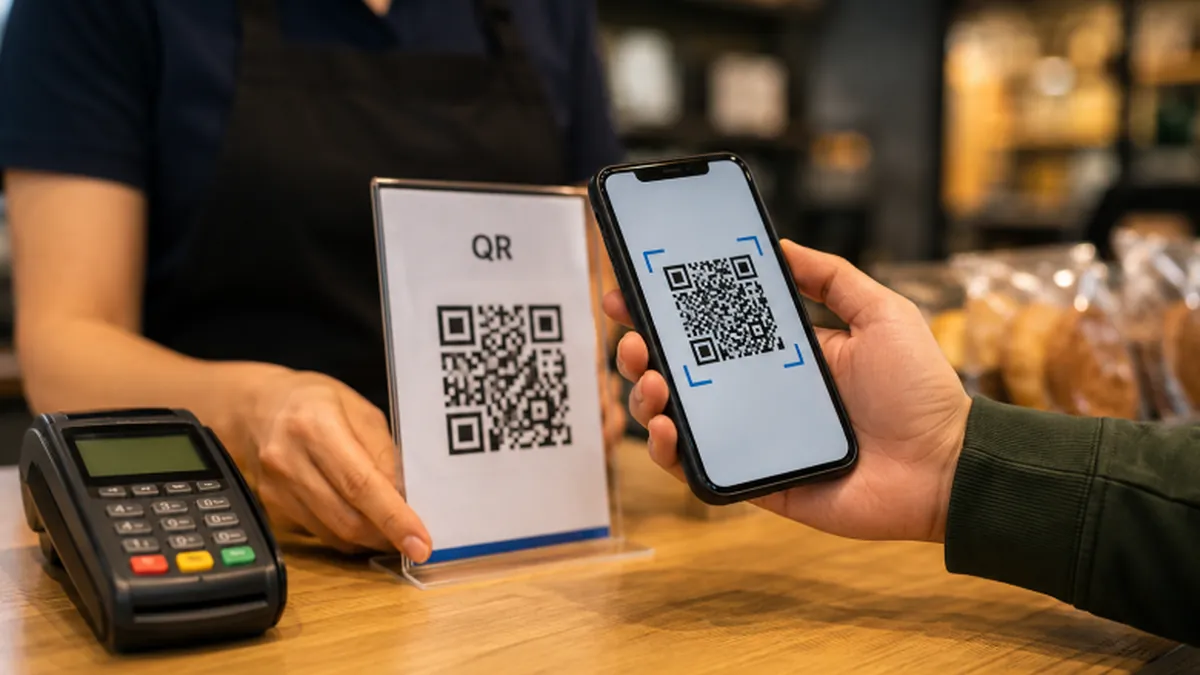
Payments are the fourth strong use case, with a caveat. A static QR code linked to your payment profile works fine for tips and fixed-price items — the classic tip jar with a code on it. But if the amount varies per customer, you want the code to carry the amount too, which means generating it per transaction or using a dynamic code that redirects to a payment page. A static code that opens a blank payment screen and asks the customer to type the amount is barely better than no code at all.
Static vs dynamic QR codes
Now the distinction that matters more than anything else in this guide: static versus dynamic QR codes. A static code has the destination baked directly into the pattern — the URL, the Wi-Fi credentials, the text are all encoded in the squares themselves. It works forever, costs nothing, and nobody can ever change where it points. A dynamic code encodes a short redirect link, and the actual destination lives on a server you control, so you can change where it points later and count how many people scanned it.
Static codes are perfect for anything that will never change. Wi-Fi credentials, a link to your homepage, your vCard on a business card, a PDF menu that is genuinely final. They are free to make, they never expire, and they keep working if the generator company goes out of business tomorrow, because there is no middleman. FreeToolsBox's QR Code Generator makes static codes, which is exactly what most small businesses need most of the time.
Dynamic codes earn their keep when the destination might move. A printed menu on a table tent that links to this season's specials. A flyer for an event whose ticketing page might change. A product label that should point at the manual for the current model. If reprinting would cost real money, dynamic is worth it — but read the pricing first, because many dynamic-code services are free for a trial and then charge a monthly fee, and some will deactivate your codes if you stop paying.
The subscription trap in dynamic codes
That last point deserves emphasis because it bites people. A dynamic code is a subscription disguised as a printout. Before you put dynamic codes on anything permanent — signage, packaging, vehicle wraps — check what happens to your codes if you cancel. With static codes this question never comes up, which is why the default choice should be static unless you have a specific reason to need the redirect.
Design mistakes kill more QR codes than bad placement does. The most common one is size. A code that is too small or too dense will not scan reliably, especially in dim light or from an older phone. The rough rule is that the code should be at least about an inch (2.5 cm) across for arm's-length scanning, and it should grow as the scanning distance grows — a code on a wall poster scanned from three meters away needs to be much bigger than one on a business card. When in doubt, print bigger.
The second design mistake is crowding the code. Every QR code needs a quiet zone — a clear margin around all four sides, roughly as wide as one row of the code's modules — so the camera can tell where the code ends and the background begins. Text, borders, and decorative graphics that touch the code will break scans. Give it breathing room and it will reward you.
Design mistakes that break scans
Contrast matters more than color. Codes work by distinguishing dark modules from light ones, so dark-on-light is the safe choice. Inverted codes (light on dark) fail on many scanner apps, and low-contrast color combinations — pale blue on white, red on orange — are unreliable in poor lighting. If your brand colors cannot produce strong contrast, keep the code black on white and put your branding around it instead of inside it.
Density is the hidden trap. The more data you encode, the denser the grid of squares, and the harder the code is to scan. A short URL makes a clean, open code; a three-hundred-character link with tracking parameters makes a tight, fussy one. If your destination URL is long, shorten it first, or better, point the code at a short page on your own site that redirects. Simpler code, faster scan.
Error correction is the feature that lets codes survive damage — coffee stains, folded flyers, partially scratched stickers. QR codes have four correction levels (Wikipedia's QR code article explains each), and most generators pick a middle one by default. If your code will live somewhere rough — a workshop wall, outdoor signage, a delivery van — generate it at the highest correction level. The code gets slightly denser, but it keeps scanning after real-world abuse.
Placement, testing, and tracking
Placement mistakes are the other half of failures. Codes behind reflective glass, on curved surfaces, on the side of a moving vehicle, or in a spot with no phone signal all underperform. And the most common placement mistake of all: a code with no call to action. “Scan me” is not a reason. “Scan for today's menu,” “Scan to join Wi-Fi,” “Scan for 10% off” — each tells the customer exactly what the scan buys them.
Test before you print. This sounds obvious and almost nobody does it. Scan the code with two or three different phones — an iPhone and an Android at minimum — in the actual lighting where it will live, from the actual distance people will stand. A code that scans perfectly on your bright office monitor can fail on a dim restaurant wall. Ten minutes of testing saves a thousand misprinted flyers.
If you want to know whether your codes are working, you have two honest options. Dynamic codes usually come with scan analytics built in. Static codes can be tracked by adding UTM parameters to the destination URL — the code itself stays dumb, but your analytics will show visits tagged with the campaign name you chose. Either way, track something, because a code nobody scans is decoration, and decoration does not need a QR code.
Privacy and where not to bother
There is also a privacy angle worth thirty seconds. A QR code is just a machine-readable link, and scanning one tells the destination site that someone arrived. Do not promise customers anonymity you cannot deliver, and do not put codes on anything sensitive — a code that opens a pre-filled form with someone's personal details is a privacy accident waiting for a screenshot. Keep codes pointed at public pages.
So where should you not bother? Anywhere the audience is already looking at a screen — an email campaign, your own website, a desktop app — because a clickable link beats a scannable code every time. On tiny business cards where the code would be unreadably small. And anywhere the code replaces something that already takes two seconds, like a phone number on a shop sign that people can just read.
A practical rollout order for a typical small business: first, the Wi-Fi code, because it pays off daily and never changes. Second, the review code at the point of sale, because reviews compound. Third, the menu or price-list code, dynamic if prices move. Fourth, payment codes where they fit. Each one is a ten-minute job — our guide to making a QR code free walks through the whole process — and each one removes a small friction that your staff currently handles by hand.
Your rollout order
One last thing about free generators: a static QR code has no expiry date and no owner, so a free tool is genuinely all you need. The business model of most “free QR code” sites is upselling you to dynamic codes and analytics, which is fine as long as you know what you are buying. Generate the code, download the high-resolution file, keep a copy, and you are independent of the tool forever.
QR codes are a bridge between the physical things you already have — tables, counters, walls, packaging — and the digital things you want customers to reach. Build the bridge where crossing it is obviously easier than the alternative, keep the code big, high-contrast, and honest about its destination, and it will quietly do its job for years. That is the entire secret, and it fits on a sticker.